 How-to
What to Do When Your Car Key Fob Isn't Detected
Last Updated: November 6, 2026
Click her to check out our Dead Key Fob Guide
Quick Summary
When your key fob not detected warning appears, first try the backup start method: hold the fob against the start button or in the console slot and press the brake, then the button. If that fails, try the spare fob, move away from interference, and check the fob battery.
- The mechanical emergency key blade opens the driver's door but will not start the car.
- A weak fob battery usually shows up as the fob working up close only.
- If both fobs fail at every distance, suspect the receiver or antenna and get a diagnostic scan.
- After a battery swap, check orientation and type, then try a resynchronization sequence.
- Never let anyone drill a lock or pry a door as a first move.
Table of Contents
- What "Key Not Detected" Actually Means
- How to Start a Car When the Key Fob Is Not Detected
- Key Fob Not Detected but Battery Is Good: What to Check Next
- Key Fob Not Detected After Battery Replacement
- Separating Fob, Vehicle Battery, and Receiver Faults
- Car Key Fob Reprogramming: When a Reset Is the Only Fix
- What to Do When You're Stranded and Need Help Now
- Call for Mobile Dispatch and Get Back on the Road
- Frequently Asked Questions
What "Key Not Detected" Actually Means
A "key not detected" message means your car's computer cannot find the fob's radio signal.
This guide from Dealerkeys covers exactly what to do if your car key fob is not detected.
Here's the key fact most drivers miss: your car does not need a working fob battery to start.
Below, we'll walk through the backup start steps, the checks to run next, and when to call a professional.
How to Start a Car When the Key Fob Is Not Detected
Start with the backup method first. It gets you moving before you troubleshoot anything else, and it costs nothing to try.
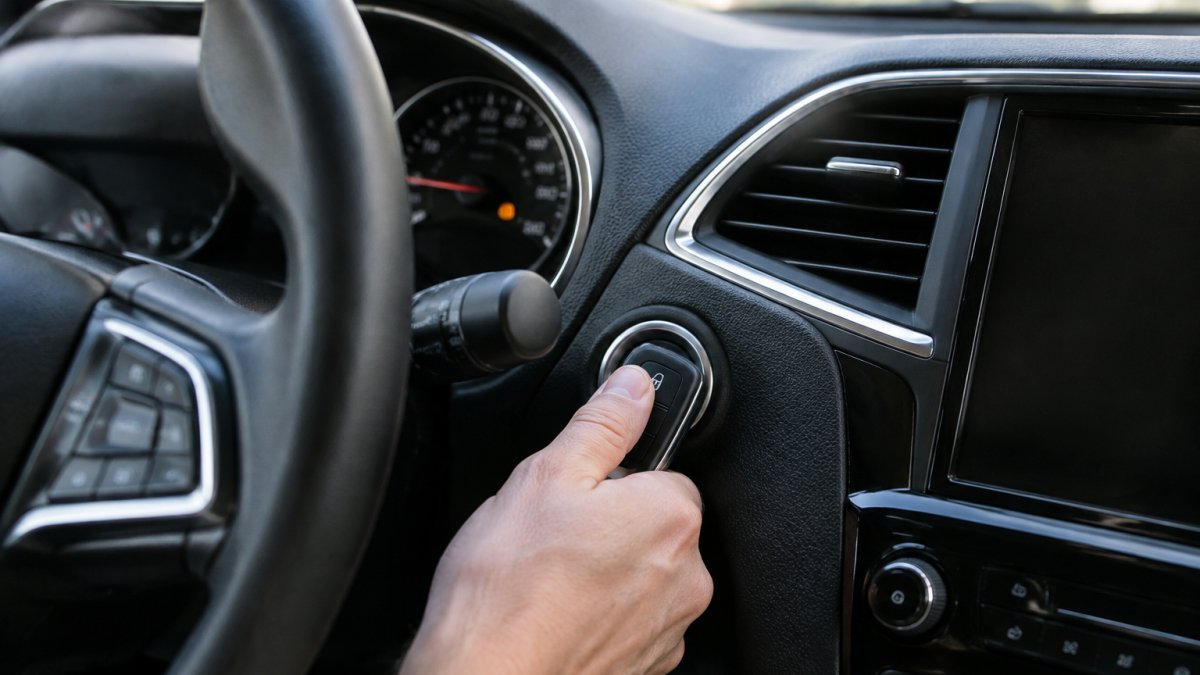
Some vehicles use a backup sensor near the start button or in the center console to read the fob at close range.
The Backup Start Procedure: Where to Hold the Fob
Hold the fob against the start button and press the brake. Then push the button with the fob itself.
Where you place the fob depends on the make:
- Toyota and Lexus: touch the fob to the start button
- Honda and Acura: hold the fob near the button, then press it
- Ford and Lincoln: place the fob in the backup slot inside the center console
That list is a starting point, not a rule. Backup detection locations vary by make, model, and model year, and the only authoritative source for your vehicle is the owner's manual.
Watch out: pressing the start button repeatedly without the brake pedal, or holding the fob at the wrong spot for several seconds, can trigger a lockout timer on some vehicles.
Using the Mechanical Emergency Key Blade
Every smart key hides a metal blade inside it. Press the release tab and pull the blade out.
Use the blade to open the driver's door when the fob is dead. Some vehicles also have a hidden keyhole under a plastic cap on the door handle.
The blade will not start the car. It only gets you inside so you can use the backup start method.
A Safe, Ordered Diagnostic Path Before You Call Anyone
Once you are inside, work from the lowest-risk check to the highest. This order keeps you from buying a battery you do not need or paying for a tow you could have avoided.
- Try the backup start method once more, slowly. Press the brake firmly, hold the fob flat against the button or slot, and give the system a full second to read it.
- Try the spare fob. If the spare starts the car, the problem is in the first fob, not the vehicle. If neither fob works, the fault is likely in the vehicle's receiver, antenna, or immobilizer.
- Move the fob away from interference. Set it on the seat away from your phone, charger, and any aftermarket electronics, then retry.
- Check the fob battery. A fresh coin-cell is cheap and rules out the most common cause. Confirm the correct type and polarity before you close the case.
- Check the vehicle's 12-volt battery. Slow cranking, dim interior lights, or a battery that has sat for weeks point to a weak vehicle battery, which can cause key-recognition errors.
- Look for physical fob damage. Worn buttons, a cracked case, or corrosion on the contacts can stop transmission even with a good battery.
- Stop and call a professional. If both fobs fail and the vehicle battery is strong, the next step is a diagnostic scan, not another parts swap.
This sequence separates fob faults from vehicle faults before you spend money.
If the backup method fails and you are not in a safe place, stop troubleshooting and move to the stranded-driver steps below.
Key Fob Not Detected but Battery Is Good: What to Check Next
If the fob has a fresh battery and the car still won't see it, the problem is elsewhere. Work through these checks in order.
For a full step-by-step signal test, see our guide on how to test a key fob signal. It walks through battery checks, range tests, and interference checks you can do at home.
Signal Interference and Environmental Causes
Radio interference can block a fob signal in seconds. Common culprits include:
- Phone chargers and USB cables near the fob
- Parking garages with heavy steel and wiring
- Cell towers, radio antennas, or power lines overhead
Move the fob away from your phone and try again. Step ten feet from the car and retry. If it starts away from the interference, you've found your cause.
Fob Damage, Worn Buttons, and Internal Faults
Look at the fob itself. A common mistake is assuming a good battery means a good fob.
Check for these signs:
- Buttons that feel mushy or stick down
- Cracks in the case or a loose seam
- Corrosion on the battery contacts
Worn buttons and broken internal connections stop the fob from sending a signal. A diagnostic scan confirms whether the fob is transmitting at all.
Key Fob Not Detected After Battery Replacement
First, check the battery orientation. The flat side with the "+" mark faces up in most fobs.
Second, check the battery type. Most fobs use a CR2032 or CR2025 coin-cell. Mixing them up can cause a loose fit and a weak connection.
Third, some fobs need a resynchronization after a battery swap. The fix is often simple:
- Press any button on the fob
- Insert the fob into the backup slot
- Press the start button once
- Wait a few seconds, then try a normal start
If the fob still isn't recognized, the pairing may have dropped. That's a programming issue, not a battery issue.
Separating Fob, Vehicle Battery, and Receiver Faults
Three different faults produce the same warning. Sorting them out saves time and money.
Symptom | Likely Fault | First Check |
|---|---|---|
Fob works up close only | Weak fob battery or signal | Replace coin-cell battery |
No response at all, any distance | Dead fob or failed pairing | Try the spare fob |
Slow crank, dim lights, no start | Weak 12-volt battery | Test vehicle battery |
Spare fob also fails | Receiver or antenna fault | Diagnostic scan |
Warning appears while driving | Immobilizer or receiver issue | Professional diagnosis |
A weak 12-volt battery causes odd electrical behavior, including key recognition errors. Test the vehicle battery before you blame the fob.
If both fobs fail, the receiver or antenna is the suspect. Our guide on immobilizer fault repair explains the symptoms and when a mobile locksmith can fix a no-start condition.
Car Key Fob Reprogramming: When a Reset Is the Only Fix
Reprogramming is the fix when the fob is fine but the car no longer recognizes it.
Some vehicles let you pair a fob yourself with a button sequence. Others need OEM-level tools and a security code.
You can look up your vehicle with our key fob programming lookup to see whether you can do it yourself or need a locksmith.
At Dealerkeys, we program fobs on-site with OEM-level tools. We also offer mail-in repair for BCM, ECU, and immobilizer modules, and clone modules when a replacement unit needs to match your vehicle's original programming.
What to Do When You're Stranded and Need Help Now
Stay safe first, then get help. Put your hazards on and move out of traffic if you can.
If the backup start method has already failed, do not keep cycling the button. Repeated failed attempts drain the vehicle battery and can trigger a longer immobilizer lockout. Here is the order that works:
- Confirm you are in Park or Neutral with the brake firmly pressed. A shifter that is not fully seated is a common reason a push-button start will not engage.
- Try the spare fob one time. If it starts the car, drive home or to a safe lot before you troubleshoot the first fob.
- Call roadside assistance through your insurer, auto club, or manufacturer program. Some policies include lockout and jump-start service, and a jump start can help confirm whether a weak 12-volt battery is the cause.
Watch out: never let anyone drill a lock or pry a door as a first move. Non-destructive entry is the approach to look for in a provider.
If you are stranded with a child, a pet, or in extreme heat or cold, call 911 or a non-emergency line for your area and tell them your location.
A mobile locksmith can come to you and program a new key or fob on-site, which can save a tow to the dealer. Our guide on getting mobile locksmith services covers how to verify a provider and what to expect on-site.
Call for Mobile Dispatch and Get Back on the Road
A dead fob shouldn't cost you a day. Most key and fob problems have a fast fix, and the backup start method buys you time until it's handled.
Dealerkeys offers mobile dispatch service seven days a week in East Tennessee. We cut and program keys on-site with OEM-level tools, diagnose anti-theft and electrical faults, and repair BCM, ECU, and immobilizer modules through our mail-in service. If you want to know how long a visit takes, our guide on mobile key replacement timing breaks it down.
Get started with Dealerkeys and drive away with a working key, not a tow bill.
Frequently Asked Questions
Can I still drive if my car says key not detected?
In most cases, yes. If the engine is already running and the key fob not detected warning appears, the vehicle will usually keep running until you shut it off. The immobilizer only prevents a new start, not an active one. Do not turn the engine off until you reach a safe location. Once stopped, use the backup start procedure: hold the fob against the start button or the marked sensor area, then press the brake and the button together.
What should I do if the key fob is not detected after battery replacement?
First, check that the new coin-cell battery is seated correctly and that the polarity matches the diagram inside the fob case. A common mistake is installing the battery upside down or leaving the protective film on. If the battery is correct, try the backup start method by holding the fob against the start button. Some vehicles require a resynchronization step after a battery change, which may involve pressing buttons in a specific sequence or using a diagnostic tool. If the fob still fails, a locksmith can test the signal and reprogram it if needed.
How can I tell if the problem is the fob or the car?
Test with a spare key fob if you have one. If the spare works, the original fob is the problem, likely a dead battery, damaged internal connections, or a failed transponder. If neither fob works, the issue is probably in the vehicle: a weak 12-volt battery, a faulty receiver, or an immobilizer fault. A diagnostic scan can confirm which component is failing. Mobile locksmiths carry test equipment to check fob signal output and vehicle receiver response on site.
Does AutoZone reset key fobs?
AutoZone and similar parts stores can test your fob battery and sell replacements, but they do not program or reset key fobs. Fob programming requires dealer-level or OEM-equivalent diagnostic tools that are specific to each make and model. For car key fob reprogramming, you need a qualified automotive locksmith or a dealership. Mobile locksmith services can often program a new fob on site, saving you a tow and a dealership visit.